
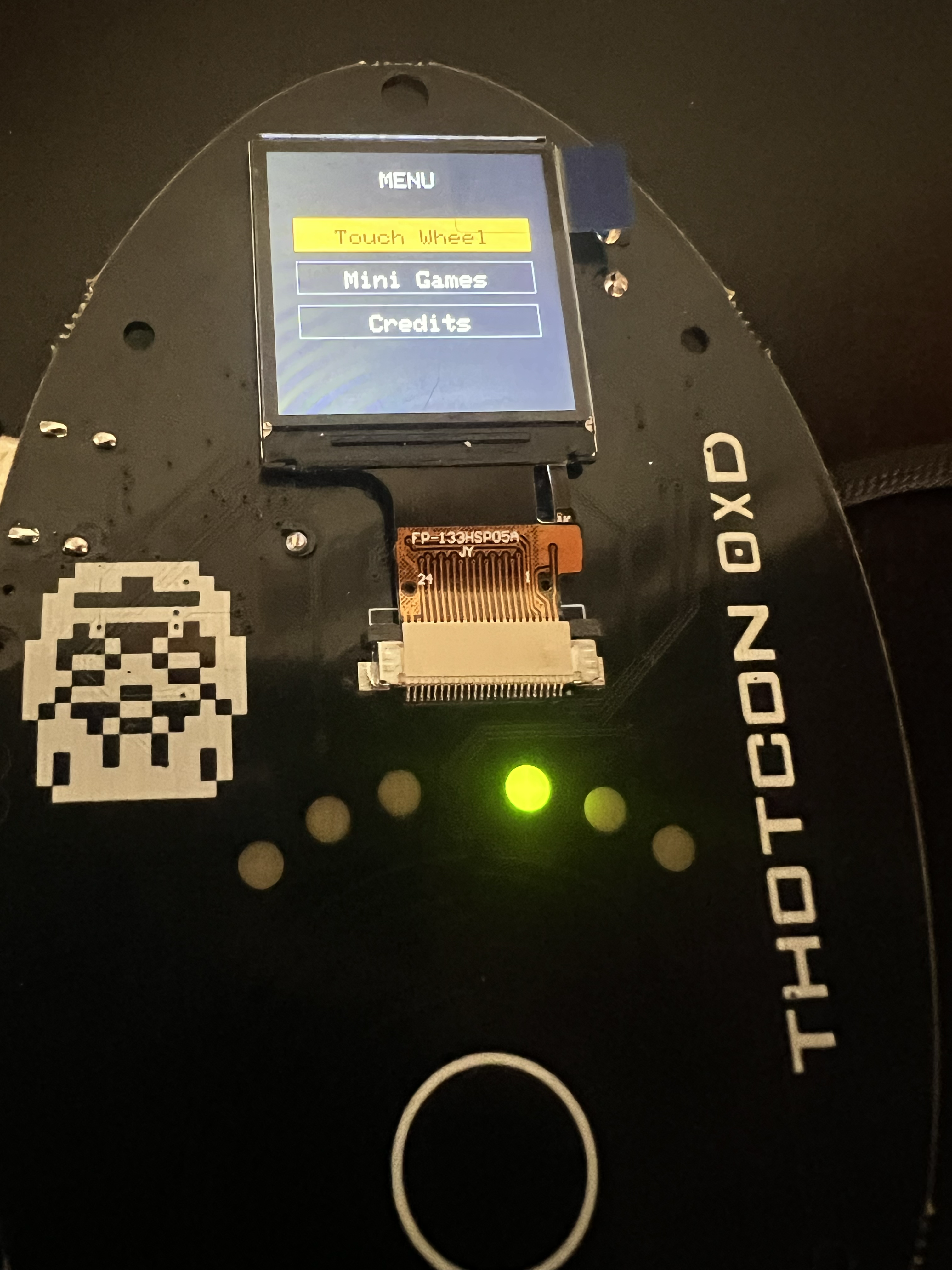
THOTCON 0xD Badge — Part 3: The Firmware
We open-sourced the THOTCON 0xD badge firmware: three builds for testing the touch wheel, making music, and building menus. GitHub link inside.
Introduction: When Conference Badges Become Something More
Conference badges have evolved far beyond simple name tags. At Thotcon, attendees received an interactive touch wheel badge that showcased cutting-edge capacitive touch sensing, colorful displays, and engaging audio feedback. But what happens when the conference ends?
Rather than letting this innovative hardware gather dust in a drawer, we've transformed it into something much more valuable: an open-source development platform that anyone can learn from, modify, and build upon.
The Evolution
The original badge firmware was a complete experience—WiFi connectivity, custom splash screens, game content, and even a musical intro sequence. While impressive for a conference setting, these features created barriers for developers wanting to understand and modify the code.
Our mission for this firmware dump was simple: strip away the complexity and reveal the core innovations that make this badge special. The result is three distinct firmware packages, each serving different learning objectives and use cases.
Meet the Three Firmware Flavors
1. working/ - The Foundation
Perfect for: Hardware testing, learning basics, debugging
Sometimes you just need to know if your hardware works. The working firmware is the digital equivalent of a multimeter—it tells you exactly what's happening with your touch sensors, displays the raw data, and provides immediate visual feedback.
Key Features:
- Real-time sensor readings displayed on screen
- Simple LED response to touch position
- Serial output for debugging and analysis
- Automatic calibration with progress display
- Minimal code complexity for easy understanding
This firmware answers the fundamental question: "Is my touch wheel actually working?" It's where every developer should start.
2. tonechaser/ - The Artist
Perfect for: Musical projects, visual effects, creative applications
Music and technology have always been natural partners, and the tonechaser firmware transforms your badge into a portable musical instrument. Using sophisticated algorithms, it converts touch position into musical notes, scales, and chords.
Key Features:
- Four Musical Modes: Free Play, Scale, Chord, and Arpeggio
- Multiple Musical Scales: Major, Minor, Pentatonic, and Blues
- Visual Synthesis: Color-coded wheel segments with dynamic effects
- Smooth Interpolation: Continuous tone generation between positions
- Audio Synthesis: Real-time frequency generation from touch input
The magic happens in the mathematical relationship between touch position and musical frequency. Touch sensors positioned 120° apart use trigonometric interpolation to create smooth, continuous control around the full 360° wheel.
3. wheel_visualization/ - The Platform
Perfect for: Complete applications, menu systems, user interfaces
The most sophisticated of the three, wheel_visualization demonstrates how to build a complete interactive system. It features a full menu system, multiple screens, and a modular architecture that makes adding new features straightforward.
Key Features:
- Complete Menu System: Navigate between different modes using the touch wheel
- Modular Architecture: Clean separation between screens and functionality
- Interactive Demos: Touch wheel visualization with real-time feedback
- Extensible Design: Easy to add new screens and features
- Professional UI: Polished interface with proper navigation and feedback
This firmware shows how the touch wheel concept can scale from a simple demo to a full-featured application platform.
The Technology Behind the Magic
Capacitive Touch Sensing
The heart of the system is three capacitive touch sensors positioned 120° apart around the wheel perimeter. This isn't just three separate buttons—it's a sophisticated position sensing system.
// Calculate angle using trigonometric interpolation
float x = norm1 - 0.5f * (norm2 + norm3);
float y = 0.866f * (norm2 - norm3); // 0.866 is sin(120°)
float angle = atan2(y, x) * 180.0f / PI;
By measuring the relative capacitance at each sensor, the firmware can triangulate your finger's exact position around the wheel. The algorithm smoothly interpolates between sensor readings, providing 360° of continuous position data.
Visual Feedback System
The ST7789 TFT display isn't just showing pretty colors—it's providing real-time feedback that makes the touch wheel feel responsive and alive. The visualization uses double-buffering and selective redrawing to maintain smooth frame rates even with complex effects.
Audio Synthesis
Rather than playing pre-recorded sounds, the firmware generates tones in real-time using the ESP32's built-in PWM capabilities. This approach provides unlimited flexibility for creating musical scales, sound effects, and audio feedback.
Hardware: Surprisingly Accessible
The pin configuration is well-documented and easily adaptable to different ESP32 boards:
// Display pins (SPI)
#define TFT_MISO 19
#define TFT_MOSI 23
#define TFT_SCLK 18
#define TFT_CS   15
#define TFT_DC    2
#define TFT_RST   4

// Touch sensors
#define Q1_PIN 13      // 120° apart
#define Q2_PIN 12
#define Q3_PIN 14
#define SELECT_PIN 27  // Center button
Getting Started: Zero to Touch Wheel in 30 Minutes
The setup process is designed to be as friction-free as possible:
- Install Arduino IDE and ESP32 board package
- Configure TFT_eSPI library for ST7789 display (detailed instructions provided)
- Choose your firmware based on your goals
- Upload and explore
The most critical step is configuring the TFT_eSPI library. The library needs to know which display driver to use and how the pins are connected:
// Add to User_Setup.h in TFT_eSPI library
#define ST7789_DRIVER
#define TFT_WIDTH  240
#define TFT_HEIGHT 320
// ... pin definitions
Applications and Use Cases
Educational Projects
The three-tier approach makes this perfect for educational settings:
- Beginners start with
workingto understand sensors - Intermediate users explore
tonechaserfor audio/visual synthesis - Advanced developers use
wheel_visualizationas an application framework
Rapid Prototyping
Need to prototype a circular interface? The touch wheel provides immediate tactile feedback and visual confirmation. It's perfect for:
- Volume controls
- Color pickers
- Navigation interfaces
- Gaming controllers
- Musical instruments
Community and Collaboration
Open Source by Design
All code is available on GitHub with permissive licensing. The goal is to enable innovation, not restrict it.
Documentation First
Comprehensive README files, inline comments, and troubleshooting guides ensure that developers can get up and running quickly.
Performance and Optimization
Real-Time Constraints
Touch sensing, audio synthesis, and visual updates all happen in real-time with strict timing requirements. The firmware demonstrates several optimization techniques:
- Selective Screen Updates: Only redraw changed areas
- Efficient Touch Processing: Smart filtering and smoothing
- PWM Audio: Hardware-accelerated tone generation
- Memory Management: Careful sprite and buffer usage
Scalability Considerations
The ESP32 provides plenty of headroom for additional features. Current utilization:
- Memory: ~60% of available RAM
- Flash: ~40% of available storage
- CPU: ~30% utilization during normal operation
Future Directions
Potential Enhancements
The platform is designed for expansion:
- Wireless Communication: Add ESP-NOW or WiFi features
- Sensor Fusion: Integrate IMU for gesture recognition
- Advanced Graphics: 3D effects and animations
- Machine Learning: Touch pattern recognition
- IoT Integration: MQTT, cloud connectivity
Community Contributions
We encourage community contributions in several areas:
- New Firmware Modes: Games, utilities, demos
- Hardware Variations: Different sensors, displays, form factors
- Documentation: Tutorials, guides, application notes
- Testing: Bug reports, performance analysis
Conclusion: From Badge to Platform
What started as conference swag has evolved into a complete development platform. The touch wheel badge demonstrates that innovative hardware doesn't have to remain locked behind proprietary barriers—with the right approach, it can become a catalyst for learning, creativity, and community innovation.
Whether you're a student learning embedded systems, an artist exploring interactive media, or a developer prototyping new interfaces, these firmware packages provide a solid foundation for your projects.
The three-firmware approach ensures there's an appropriate starting point for every skill level, while the open-source nature guarantees that the platform will continue to evolve with community contributions.
Ready to get started?
- Clone the repository from GitHub
- Follow the setup instructions in the README
- Start with
workingto test your hardware - Progress to
tonechaserfor creative projects - Build complete applications with
wheel_visualization
The wheel is yours to reinvent.
Resources
- GitHub Repository
- Original Badge Creator: Fourfold
Technical Specifications
- Microcontroller: ESP32 (240MHz dual-core)
- Display: ST7789 240x320 TFT
- Touch Sensing: 3x capacitive sensors + 1 center button
- Audio Output: PWM-based tone generation
- Visual Output: 6x addressable LEDs
- Power Requirements: 5V USB or 3 AAAs
- Development Environment: Arduino IDE with ESP32 package
- Required Libraries: TFT_eSPI (configured for ST7789)